14 februari 2026 · Leadflow Team
Stop Losing Leads: Build Efficient Automated Workflows for SMBs in 7 Days
A practical 7-day playbook for SMBs and agencies to automate lead capture, AI qualification, multi-channel follow-up, and pipeline handoffs so no lead gets lost.
Stop Losing Leads: How To Create Efficient Automated Workflows For SMBs In 7 Days
Manual follow up wastes time and costs deals. In this guide, we show how SMBs and agencies can create efficient automated workflows that turn every lead into revenue using modern CRM, sales-automation, and messaging tools.
Key Takeaways
Question | Key Answer |
|---|---|
How do SMBs start with automated workflows? | Start by mapping your lead journey, then connect capture, follow up, and pipeline stages inside an smb-crm like LeadFlow. |
What tools are essential for automation? | You need a central crm, messaging automation (WhatsApp, SMS, email), pipeline-management, and basic analytics, which you can explore via the LeadFlow product overview. |
How much does automation typically cost for SMBs? | All-in-one tools often start around €29 – €59 per month for core automation features, as shown on the LeadFlow pricing page. |
Can automation handle Meta Lead Ads and lead-management? | Yes, you can pipe meta-lead-ads directly into your lead-management workflows, which you can learn more about in the LeadFlow resources center. |
What is AI lead scoring and why does it matter? | ai-lead-scoring automatically ranks leads by intent and fit so your team focuses on the best opportunities first, explained in detail in the AI lead scoring guide. |
Where can I see examples of automated workflows? | Review real automation workflows and implementation tips in LeadFlow’s automation workflows hub and broader AI automation resources. |
How do I turn automation into real revenue gains? | Combine automated capture, instant follow up, smart routing, and appointment-booking, then track impact in your pipeline and analytics using the playbooks in sales automation resources. |
1. Why SMBs Need Automated Workflows Now, Not “Someday”
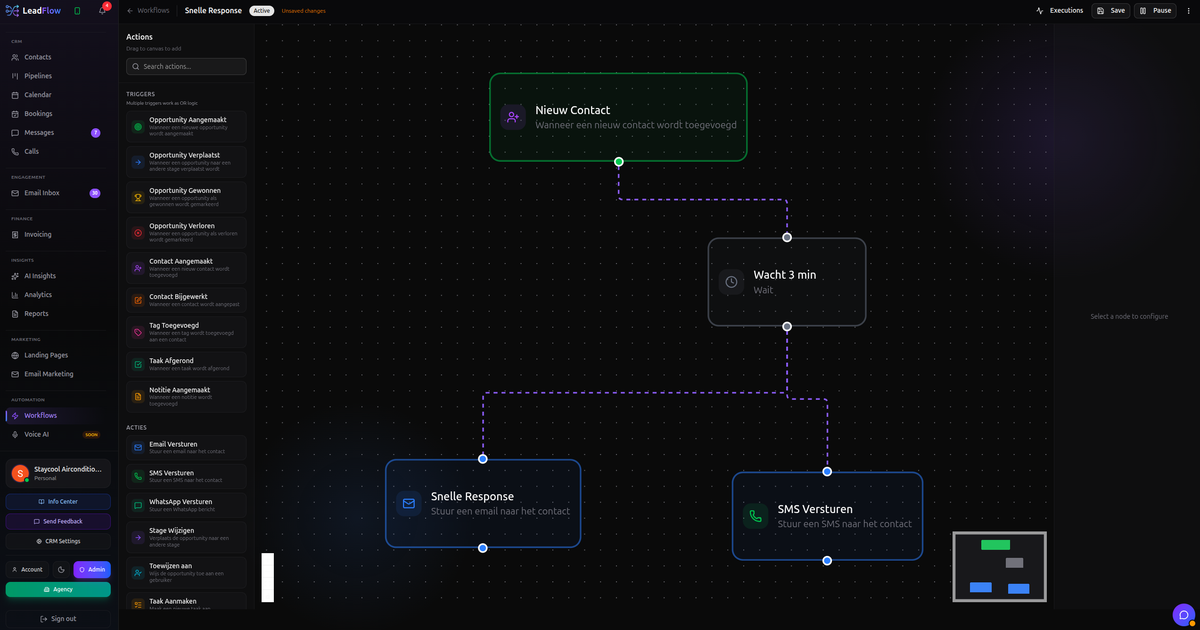
SMBs and agencies lose deals when leads wait hours for a reply, get forgotten in spreadsheets, or bounce between disconnected tools. Automated workflows fix this by connecting capture, qualification, follow up, and pipeline-management in one continuous flow.
We see small teams close more deals with less effort when they standardize how every lead is handled and let automation handle the repetitive work. That is the core of building an effective smb-crm environment.
2. Map Your Lead Journey Before You Automate Anything
Every efficient automated workflow starts with a clear map of your lead journey. We recommend you sketch the flow from first touch to closed deal, including meta-lead-ads, website forms, referrals, and inbound calls.
For each step, define who is responsible, what data you collect, what message you send, and which outcome you expect. This blueprint lets your crm workflows mirror how your team already sells, instead of forcing a new process on them.
Key stages to map
Lead capture (ads, landing pages, forms, imports)
Qualification and ai-lead-scoring
First contact and nurture using whatsapp-automation, sms-automation, and email-automation
Discovery, proposal, and appointment-booking
Won / lost handoff and after-sale follow up
3. Centralize Lead Management In An SMB-Focused CRM
Once the journey is clear, you need a single system to capture and manage every lead. Using multiple tools for ads, forms, email, and pipeline usually creates gaps and manual work.
A modern smb-crm or agency-crm should combine lead-management, contact records, activity tracking, and messaging in one platform. LeadFlow is designed exactly for this, with Meta integration, real-time analytics, and automation in one connected flow.
What to look for in your CRM
Native meta-lead-ads integration and instant lead capture
Built-in pipeline-management with Kanban boards
Multi-channel inbox for WhatsApp, SMS, and email
Automation builder that non-technical teams can use
4. Connect Meta Lead Ads And Lead Capture To Your CRM
One of the fastest wins for SMB automation is to connect meta-lead-ads directly into your CRM and workflows. This removes manual CSV exports and ensures every new lead gets an instant response.
With LeadFlow, Meta ads integration is part of the core feature set and included even in the Basic plan at around €29 per month. For many SMBs and agencies, this single connection already pays for itself with saved time and rescued leads.
Designing an automated lead capture flow
Run Facebook or Instagram Lead Ads to a simple form.
Auto-sync every lead into your crm with tags like campaign and offer.
Trigger welcome email-automation plus a WhatsApp or SMS follow up if phone opt-in is present.
Assign the lead to the right pipeline and rep based on location, budget, or service line.
This infographic highlights five key benefits of automated workflows for SMBs. See how automation boosts efficiency, consistency, and faster, error-free processes.
5. Use AI Lead Scoring To Prioritize High-Intent Leads
Not every lead is ready to buy now. ai-lead-scoring helps your team focus on the hottest opportunities while automation nurtures the rest in the background.
We use AI to analyze form answers, campaign source, engagement, and behavior to assign each contact a score. You can then trigger different workflows for hot, warm, and cold segments without any manual sorting.
Practical scoring workflow example
Score ≥ 80: assign to a sales rep, start instant WhatsApp + SMS follow up, create task today.
Score 50–79: enroll in a 7 day email-automation sequence and prompt a call if they engage.
Score < 50: add to a monthly newsletter and retarget with ads.
6. Automate WhatsApp, SMS, And Email Follow Ups
Speed to lead is one of the strongest predictors of conversion for SMBs. Automated whatsapp-automation, sms-automation, and email-automation let you respond within seconds, even when your team is busy.
We advise starting with a simple three touch follow up sequence on the channels your buyers use most. A typical flow might send a WhatsApp message in the first minute, an email within 10 minutes, and an SMS after a few hours if there is no reply.
Multi-channel follow up framework
New lead captured from ads or landing page.
Instant WhatsApp message confirming details and offering a fast call slot.
Branded email with more context, testimonials, and a booking link.
Reminder SMS the next day if there is still no action.
7. Build A Visual Sales Pipeline With Automated Stage Triggers
Without clear pipeline-management, it is hard to see where deals get stuck or which activities really move revenue. We recommend using a Kanban style board with defined stages and automatic triggers.
Each time a deal moves stage, your CRM should update tasks, send internal alerts, and optionally trigger new messaging. For example, when a deal reaches “Proposal sent”, you can schedule follow up messages over 3 days if the quote is not opened or replied to.
Sample pipeline stages for SMBs
New lead
Contacted
Qualified / Discovery set
Proposal sent
Verbal yes
Won / Lost
8. Automate Appointment Booking And Calendar Handoffs
Every time your team goes back and forth to find a meeting time, you delay revenue. Automated appointment-booking lets leads pick a slot themselves and immediately updates everyone’s calendars.
In LeadFlow, calendar sync is available on higher plans like Pro around €59 per month, together with WhatsApp and SMS. When combined with sales-automation workflows, this lets you move from form fill to booked meeting in minutes, without any manual scheduling.
Best practices for automated booking flows
Include a booking link in every first reply message.
Use different calendars for different services or sales reps.
Send automatic reminders over WhatsApp or SMS to reduce no-shows.
Move deals automatically to “Discovery set” when a booking is created.
9. Track Performance With Sales Analytics And Continuous Improvement
Automation should not run blindly. You need sales-analytics to see which workflows convert, which channels perform, and where leads drop off.
We advise reviewing your dashboards weekly and making one small improvement at a time. For example, tweak your first WhatsApp message, adjust your ai-lead-scoring rules, or change how many touches your nurture sequence sends.
Metrics that matter for automated workflows
Metric | Why it matters |
|---|---|
Lead response time | Shows whether your automation is firing instantly. |
Booked meetings per 100 leads | Measures how effective your follow up and booking flows are. |
Stage conversion rates | Reveals pipeline bottlenecks that workflows can address. |
Channel performance (WhatsApp / SMS / email) | Guides where to invest more automation effort. |
10. Roll Out Automation In 7 Days With A Simple Implementation Plan
Automation does not need a long project or a big team. With a focused approach, most SMBs and agencies can launch a first version of efficient workflows in a week.
We recommend starting with one core funnel, like Meta Lead Ads to booked call, and expanding from there. Keep your first version simple, then iterate based on data and feedback.
7 day rollout checklist
Day 1: Map your lead journey and pick one main funnel.
Day 2: Set up lead-management and pipeline stages in your crm.
Day 3: Connect meta-lead-ads and landing pages.
Day 4: Build base whatsapp-automation, sms-automation, and email-automation flows.
Day 5: Configure ai-lead-scoring and routing rules.
Day 6: Add appointment-booking links and reminders.
Day 7: Test end to end and go live with a small traffic segment.
Conclusion
Creating efficient automated workflows for SMBs is not about complexity, it is about consistency. When you connect a capable smb-crm to your ads, messaging, pipeline, and calendar, you turn every new lead into a clear, repeatable sales path.
If you want a single platform to capture, score, message, and close leads, explore how LeadFlow can replace dozens of tools, support your agency-crm needs, and help you turn every lead into revenue. You can review real-world use cases and stories from customers using LeadFlow automation or learn more from our ongoing guides in the LeadFlow resource library.
Comments
Comments worden handmatig gereviewd voordat ze zichtbaar zijn.
Nog geen goedgekeurde comments.